Saturday, May 7, 2016

4 GB Internet Free with Banglalink New Connection – May 2016

Create excitement with banglalink. Because banglalink new connection is giving 4GB free internet with new connection.

► Get 4GB free internet on any amount recharge with new connection:

• Customers have activated from 29th April, 2016 will get 1GB bonus every month with a total of 4 GB internet bonus on any amount recharge (tk. 10 or more)
• Customers must have to recharge any amount to get first installment (tk. 10 or more)
• Customers must have any main account charging activity on the 30th, 60th and 90th day to get rest of the data bonus installment,
• Each 1GB data bonus will have 15 days validity.
• To check bonus data balance dial *124*1010#
• Usage window: 12am to 12pm.

► Get the best call-rate upon recharging tk.19, tk.39 &tk.59 on your new connection:

• This offer is applicable for banglalink prepaid customers who have started using their connection on or after 29th april, 2016.
• New customers will get special tariff of 25p/min on-net & 60p/min off-net with 1 second pulse on recharging exact tk. 19/39/59 at a time. Special tariff of tk. 39 and tk. 59 recharge will be applicable only on first recharge;
• tk. 39 and tk.59 mrecharge points will be restricted for rest of the banglalink customer base during offer period,
• The special tariff validity for tk.19, tk.39 and tk. 59 will be 7 days, 15 days and 30 days respectively,
• Additionally, customers will get 39 min and 59 min bonus talk-time respectively on the first tk. 39 and tk. 59 recharge. to check bonus minute balance dial *124*7#
• Bonus validity will be 15 days and 30 days respectively for tk. 39 and tk.59 recharge and can be used to all local numbers (except fnf&sfnf)
• Special tariffs will not be applicable for bonus usage,
• Customers availing this offer will not be eligible for any other special tariff or bonus offer,
• Customers can un-subscribe from the offer by dialing *166*237# which will be effective after 12am that day,
• After sending the de-registration request, if the customers recharge tk. 19 by 12:00am that day, then s/he will get the special tariff offer for 07 more days,
• The special tariff call rate will not be applicable after de-registration after de-registration,
• Customers will go back to their previous tariff plan,
• For new customer,in case of package transfer, the special tariff will be deactivated,
To enjoy this tariff again, customer has to migrate back by dialing *999*1*146# and then recharge tk. 19 exactly.

► Enjoy the following benefits with your start your new prepaid connection:

• Pre-loaded tk.5 balance with 15 day validly which can be used for any banglalink service,
• Lifetime validity for any amount recharged during the existing valid period,
• 50MB bonus internet will be valid for 3 days after receiving bonus,
• To know your outstanding internet balance, dial *124*5#
• Send up to 50 free sms to any banglalink number, valid for 10 days,
• To check your bonus sms, dial *124*4#
• Get the banglalink tune absolutely free for 30 days on amar tune,
• The amar tune service will start 6 days after the first outgoing call ,
• The amar tune service will stop after 1 month of use,
• To extend the subscription, the subscriber needs to write start and sms to 2222 number,
• To one special fnf number, enjoy 5 paisa/ 10 seconds from 12 am to 4 pm and 10 paisa /10 second from 4 pm to 12 am,
• Call any number at 18.67 paisa/ 10 second 24 hours a day.

►Source: etelecombd.com/

► Suggest Another Post:
• Banglalink 1GB Internet 7 Tk
• Recharge Based Banglalink 3G Internet Packages
• Banglalink 2GB Internet -- Data BONUS on 2GB Pack (((NEW)))
• Banglalink 26% bonus on internet pack
• Banglalink Young Professional Offer (((New)))
• Banglalink March Offer 7 Taka at 1GB Internet!
• Super-duper banglalink Inactive Reactivation offer 2016

Thursday, May 5, 2016

How to use multiple accounts with Facebook App?? (Including screenshots)

Hi, viewers today I'll show you How to use multiple accounts with Facebook App?? It's very difficult process (Including screenshots), just keep your eyes on my tutorial and you will do it. By the grace of God, I hope you are well. I'm fine. I am here before you today to the tune of Md. Shariful Islam will be presented with the main object to a Facebook app can use multiple Facebook accounts. Today I will tutorial on the subject with. So let's get started.

Facebook app on your phone, you first need to install the Google Play Store. After installing your phone to your e-mail ID and password to log in with Facebook. Now see that figure:

As long as your mind after you log in to Facebook to continue. When the time comes, you need to log in to another account. This is why they are tuned up to run a lot of important cotton Facebook account. However, logout and login again after the image below:

Than click the View menu at the bottom will have the option “Log out”.

Logout After more “Login into another account”. If you look at the figure below:

Now click “Login into another account”. Then again, another Facebook account by clicking the Email and Password to log in with that will come after.

After logging in the coming………

In fact, please click on the Ok. When you log in to another account in diameter. How do you think they'll put it here. I am by the grace of God. Now log out then log out again, Now look this figure:

Sure, seeing what was understood. Facebook app you just have to connect the two accounts. This way, you can add 5 account. Why then remove instantly.

► Suggest Another Tutorial Post:
• How to Rank Your Product First Page on Amazon within 7 days???
• Some Important Add-Ons for Mozilla Firefox (Mega Post)
• Learn Freelancing
• How to Submit Your Site on Google and Bing??
• How to successfully run/use 3G Flash Hotspot Router?
• How to submit your site to 200 Search Engine completely free???
• How to check your SIM is biometric verified or not??

Wednesday, May 4, 2016

What to do if you forget to log out of Facebook?

Someone else's cell phone, laptop or desktop forgot to log out of Facebook? Not to worry, you can log out from a distance. Cyber security experts say, if you forget to log out of someone else's device that could be a threat to privacy or personal privacy.

The cafe places like Facebook or social networking site if you forget to log out after use, it can be a threat to security. There is a simple process to log out of Facebook remotely. Some of the steps that have been logged out of the machine, it can be.

► Okk, Let’s going to begin this tutorial:

• Step-1:
Facebook, go to Settings and select it from the menu.
• Step-2:
Find “Security button” on the left side, “click” on it.
• Step-3:
Once you select the right number of options, including the "You are hire logged in" option. Edit button next to the option.
• Step-4:
Click on “Edit button.”
• Step-5:
Now you can use the Facebook time, place and type of equipment, etc. will be logged. Next to each option “End Activity” will receive the name of the button.
• Step-6:
If you want to log out of the machine, the "End Activity" to log out button is pressed. Before the number of log device, you can stop it from here.

► Suggest Another Tutorial Post:
• How to Rank Your Product First Page on Amazon within 7 days???
• Some Important Add-Ons for Mozilla Firefox (Mega Post)
• Learn Freelancing
• How to Submit Your Site on Google and Bing??
• How to successfully run/use 3G Flash Hotspot Router?
• How to submit your site to 200 Search Engine completely free???
• How to check your SIM is biometric verified or not??

Tuesday, May 3, 2016
The great extensions for Google Chrome screenshot

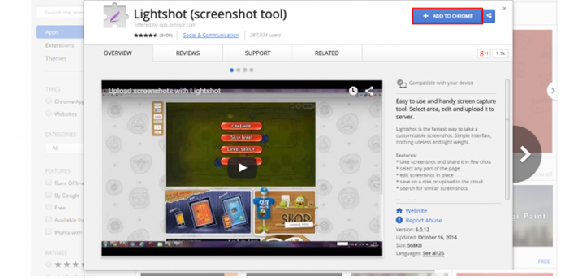
I know many of you may say that the extensions of. For those who do not know the tune. Use it allows both Windows and Chrome. So let's come up. Today I'll show you how to take a screenshot of the Google Chrome extensions to add to Lightshot. Enter the Chrome Web Store by clicking here:

https://chrome.google.com/webstore/detail/lightshot-screenshot-tool/mbniclmhobmnbdlbpiphghaielnnpgdp?hl=en

Would like that:

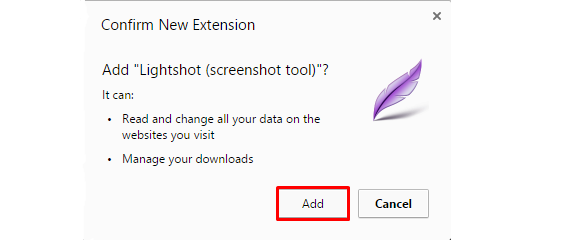
Then click “Add TO Chrome” and would like that:

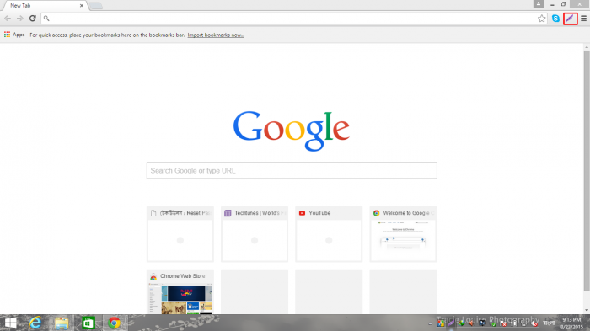
Click on “Add” wait a few minutes, the chrome is added. Now click on the icon shown below Pique in your browser and select where you want to take a screenshot. Take screenshots.

Let's come to this Lightshot will install. Now Click here to Download the Lightshot.

https://app.prntscr.com/build/setup-lightshot.exe

Direct link to this are the best. Click to start the download immediately. But you are downloading from the official site. I have the link to the official. Then install the PC. Now your Windows tray icon to open the software and select the area. Then take a screenshot by pressing CTRL + S. If you see the eyes of forgiveness for any wrong post.

► Suggest Another Tutorial Post:
• How to Rank Your Product First Page on Amazon within 7 days???
• Some Important Add-Ons for Mozilla Firefox (Mega Post)
• How to finding company website URL from company name?
• Add background music to any Blogger site
• Remove your PC shortcut virus with software
• Virus scanner for Memory card
• Take avast antivirus license has a lifetime for your computer!!

Monday, May 2, 2016
If your Chrome browser is Slow Take today's solutions!!

Technology lovers, how are you? I hope everyone is doing well. I'm no different. A little busy with studies, so as not time to write a tune. Although the timing for any other purpose is to keep you busy. I am writing today is an opportunity, but I hope not one day you will work.

Let us come to work; we are facing many problems in their daily work, most of these problems we try to solve themselves. Sometimes fail. Due to the hostile environment was like to fight us. For a few days, so I am facing a problem. Now I do not work as well. I know I know technique showing a slow slow. A technology that is better than revolution, a slow work. I got a solution. I brought it to us.

► Let's try at least once manually........

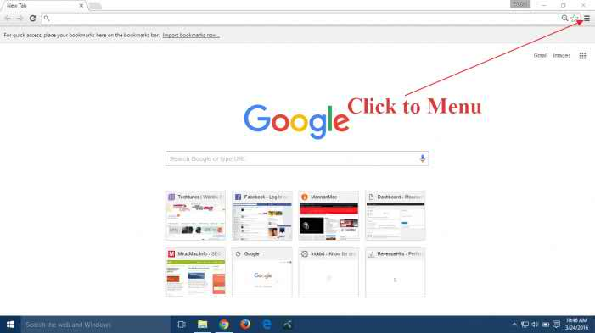
• First, open your Chrome & Go to the menu.

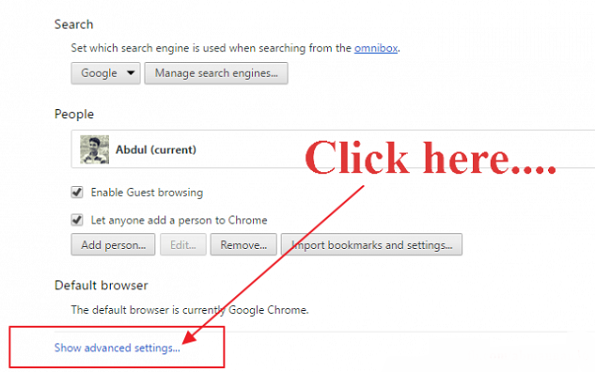
• Next go to the settings menu & then go right at the bottom, you will see. “Show Advanced Setting” Click here.

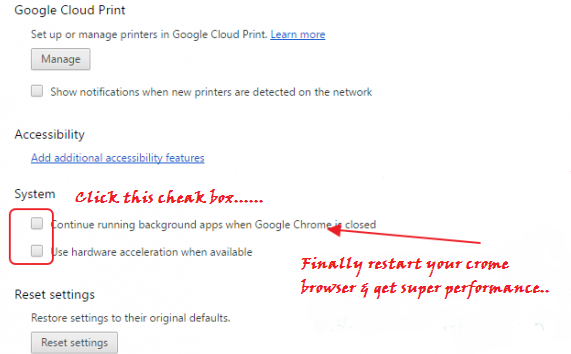
• Now go to the bottom again. Look “System” & click here. The watch has two options. There surely mark in two. Just Two clicks handed over the keys.

• Then an option comes restart of the options you will see a little. Finally restart your browser. I hope that your problem will be solved.

► Suggest Another Tutorial Post:
• How to Rank Your Product First Page on Amazon within 7 days???
• Some Important Add-Ons for Mozilla Firefox (Mega Post)
• Learn Freelancing
• How to Submit Your Site on Google and Bing??
• How to successfully run/use 3G Flash Hotspot Router?
• How to submit your site to 200 Search Engine completely free???
• Google's first page of the site to search engine optimization tips
• How to process to add “Scroll To top buttons” for your Website
• 50 Social Bookmark Site List

Sunday, May 1, 2016
Grameenphone 3GB Internet at 49 Taka

GP net offer brings new Internet offer. Now grameenphone subscriber can purchase 3GB Internet at TK 49.• Read More: How to check your SIM is biometric verified or not??

Offers and conditions:

• 3GB at Tk49(Inclusive of SD+VAT+SC) valid till for 14 Days.
• Activation Code : *5000*201#
• This offer will continue until further notice.
• Offer applicable for all prepaid and postpaid customers and can be purchased upto 10 times within campaign period.
• After Internet Volume Expiration customers will be charged Tk .01/10KB (till validity exists, up to 200 Taka).
• Unused Data Volume will not be carried forward.
• Dial *121*1*2# to know internet balance.
• 3GB will be usable from 12am till 10am for 14 days.
• Conditions Apply.

► Suggest Another Tutorial Post:
• Robi 3G or 3.5G prepaid & postpaid internet packages ((((UPDATE))))
• Teletalk 3G Prepaid Broadband Internet Data Plans
• GP 3G Prepaid & Postpaid Internet Packages (((((Update)))))
• Recharge Based Banglalink 3G Internet Packages

Saturday, April 30, 2016

How to check your SIM is biometric verified or not?? ((FREE))

As per BTRC action plan, all mobile phone users are required to re-verify their SIMs through biometric verification system. All un-verified SIMs will get closed after 30 April 2016.

►To know if your SIM is verified or not, follow below procedure to make sure:

• Check GrameenPhone SIM is biometric verified or not write Reg and send SMS to 4949 (Free)
• Check Banglalink SIM is biometric verified or not dial *1600*1# (Free)
• Check Robi SIM is biometric verified or not dial *1600*1# (Free)
• Check Airtel SIM is biometric verified or not dial *121*444# (Free)
• Check Teletalk SIM is biometric verified or not write Q and send SMS to 1600 (Free)

►Source: Telekothon.com

► Suggest Another Tutorial Post:
• Robi 3G or 3.5G prepaid & postpaid internet packages ((((UPDATE))))
• Teletalk 3G Prepaid Broadband Internet Data Plans
• GP 3G Prepaid & Postpaid Internet Packages (((((Update)))))
• Recharge Based Banglalink 3G Internet Packages

Friday, April 29, 2016

How to add Google Maps to your blogspot blog??

Google Map of the vehicle to use the Internet and it is not unthinkable. However, some say that part of Google Maps for starters jacchigugala map is very useful thing. Google map can easily know about the different parts of the world. Demand era, the use of technology, and it is a unique technology to keep pace with the world. It's pretty effective Web sites for shopping, especially customer groups and kikreta out of position, and community Web site or call the location of the map being used. However, there are many things pellama, my discussion today, "blogspot how to add google map"?

• First, go to this link https://maps.google.com, and then the places where you want to display on your blog sustain the search. See Figure:

• Now you can get your location down a bit more, click the Settings button and the "Share or embed map" Click on the image below to see:

• Then there will be a page view "Share link" and "Embed map" There are two options from among you "Embed map" and click after click on a box, the box rose to copy code. Copy the code requirements before you choose the right size. Then Copy the code. See figure below:

Login to your Blogger blog from the dashboard and Layout → Add a Gadget → HTML / Javascript, click and copy and paste the above code that has been put into the house of the Content Save the day. It's exactly the map you want to show that place.

► Suggest Another Tutorial Post:
• How to Rank Your Product First Page on Amazon within 7 days???
• Some Important Add-Ons for Mozilla Firefox (Mega Post)
• Learn Freelancing
• How to Submit Your Site on Google and Bing??

Thursday, April 28, 2016

Facebook keyboard shortcut at a glance all details!!

Hi, viewers today I'll show you Facebook keyboard shortcut. It's very easy process, just keep your eyes on my tutorial and you will do it. You all know our favorite Facebook regularly updating new way. Like Facebook before you today, I was about to take a new tune.

This morning when I was checking my Facebook aidita a massage bars are popping up in front of my eyes. Facebook had about the keyboard shortcut. I forgot to say one thing, it only applies to PC users. Many people may be familiar, but I first learned about it so I thought I should share it yourselves. So do not delay me sitting on this tune. Let's take a look if they do not waffle on Facebook keyboard shortcut.

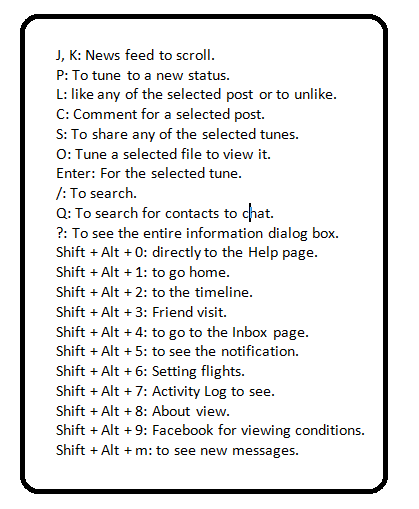
You can perform the job by pressing the following buttons:

J, K: News feed to scroll.
P: To tune to a new status.
L: like any of the selected post or to unlike.
C: Comment for a selected post.
S: To share any of the selected tunes.
O: Tune a selected file to view it.
Enter: For the selected tune.
/: To search.
Q: To search for contacts to chat.
?: To see the entire information dialog box.
Shift + Alt + 0: directly to the Help page.
Shift + Alt + 1: to go home.
Shift + Alt + 2: to the timeline.
Shift + Alt + 3: Friend visit.
Shift + Alt + 4: to go to the Inbox page.
Shift + Alt + 5: to see the notification.
Shift + Alt + 6: Setting flights.
Shift + Alt + 7: Activity Log to see.
Shift + Alt + 8: About view.
Shift + Alt + 9: Facebook for viewing conditions.
Shift + Alt + m: to see new messages.

In fact, any benefit would be very happy tune.

► Suggest Another Tutorial Post:
• How to Rank Your Product First Page on Amazon within 7 days???
• Some Important Add-Ons for Mozilla Firefox (Mega Post)
• Learn Freelancing
• How to Submit Your Site on Google and Bing??
• How to successfully run/use 3G Flash Hotspot Router?
• How to submit your site to 200 Search Engine completely free???
• Google's first page of the site to search engine optimization tips
• How to process to add “Scroll To top buttons” for your Website
• 50 Social Bookmark Site List
• How to Bing search engine in website/blogger/wordpress blog are submitted???
• How to use the images alt tag to Blogger
• How to input meta tag in blogger or website?
• How to use the images alt tag to Blogger
• How to remove duplicates in Microsoft excel???
• How to finding company website URL from company name?
• Add background music to any Blogger site
• Remove your PC shortcut virus with software
• Virus scanner for Memory card
• Take avast antivirus license has a lifetime for your computer!!

Wednesday, April 27, 2016

How to windows setup process easier to pen drive??

The grace and mercy of Allah I hope everyone is well. Alhamdulillah, I'm fine by the grace of God. One thing in mind for quite a while. Windows and how to use the Pen Drive can be set up, and that the easiest way. In a word, you can say, without any kind of trouble.

For all we know, OS / operating systems during setup setup files from the CD-ROM, then boot the PC is turned on. Which means, of course, a bootable CD of the operating system.. Right? The results of the operating system setup if you want to stick with your pen should be made; otherwise you will not be able to Run Windows Setup from your pen.

I already know a lot about this. Using some simple commands, or ISO, etc. to create a bootable pen drive but I was looking for some of the most simple. As soon as you get it going, then sat down to share with us this time, quick to learn, and let's not mention the increase.

Bootable pen, which is what you need to do:

• At least 8 GB size of a pen.
• A laptop / CD ROM, so there dektatapa.
• A Windows XP / Vista / Seven or Eight, the operating system CD. This software is called “WinUSB Maker”.
• Microsoft.NET Framework

Functionality:

First, enter your computer's USB port and CD Rom pen to enter the Windows siditio. WinUSB Maker software then select turns on your pen. See below if needed >>

Now hold your pen drive klire dragging your pen on the software release of the drug.Then over to your CD Rom klire drag and drop down on the drug program. Finally, click on the Make USB Bootable. He will ask you for a pen format. As a result of this step, click the button Yes, within a few moments you will start Bootable pen drive and USB drive and copy all the files from your Windows CD will start.

Now the Bootable Pen Drive you will be 10/15 minutes. Once done, your Pen Drive eject from the computer. Then book your notes or Windows PC that will be set up in the Pen Drive Connect the USB port. On the computer BIOS Settings and go to the Pen Drive as Boot 1st Boot to select. The diameter of the usual PC Boot from the Windows setup files to your pen drive. Then the CD Rom, in exactly the same manner from the drive to set up Windows to Windows setup. But one thing, naturally, when Windows Setup Product Key, ask. And so with pen Windows, the Product Key, a paper, write down the Tao. So that it can be used during setup.

Tuesday, April 26, 2016

Close your windows update forever!!

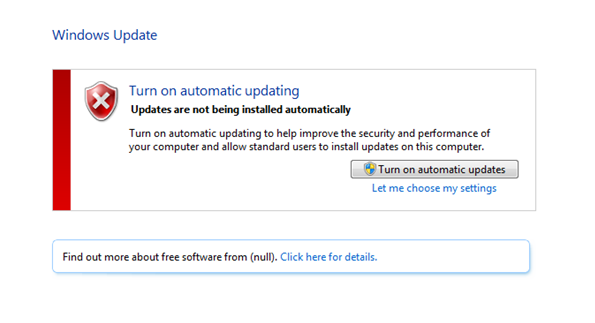
Hi, viewers today I'll show you How to close your windows update forever!! It's very easy process, just keep your eyes on my tutorial and you will do it. Now close your windows update forever made it! Save your data and the internet.

Now close your windows update forever made it! Save your data and the inter-net. Many people who think we're going to windows update Turn off automatic updating of the work. In fact, it is not right. Today I show you, how the problem will get from any problrm?

First, let's start with windows 7.
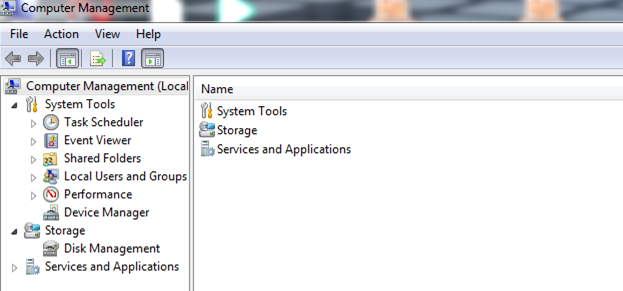
• Step-1: If your computer a Right click and click Manage. Would like the image below:

• Step-2: Click on the services and Applications.
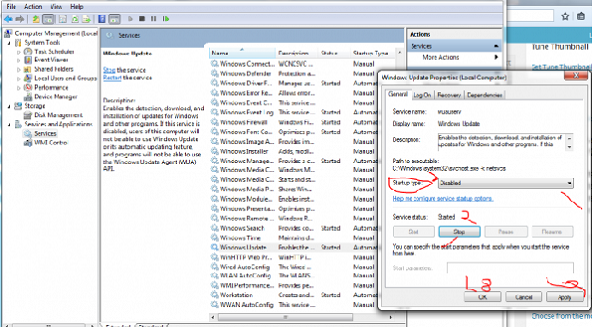
• Step-3: Then click on services. Would like the image below:

• Step-4: Click on the windows update the startup type to Disabled and click stop, wait 1 minute, then click Apply and click OK.

► Suggest Another Tutorial Post:
• How to Rank Your Product First Page on Amazon within 7 days???
• Some Important Add-Ons for Mozilla Firefox (Mega Post)
• Learn Freelancing
• How to Submit Your Site on Google and Bing??
• How to successfully run/use 3G Flash Hotspot Router?
• How to submit your site to 200 Search Engine completely free???
• Google's first page of the site to search engine optimization tips
• How to process to add “Scroll To top buttons” for your Website
• 50 Social Bookmark Site List
• How to Bing search engine in website/blogger/wordpress blog are submitted???
• How to use the images alt tag to Blogger
• How to input meta tag in blogger or website?
• How to use the images alt tag to Blogger
• How to remove duplicates in Microsoft excel???
• How to finding company website URL from company name?
• Add background music to any Blogger site
• Remove your PC shortcut virus with software
• Virus scanner for Memory card
• Take avast antivirus license has a lifetime for your computer!!

Monday, April 25, 2016

How to solve facebook photo verification problem???

I hope everyone is good friends, and that is my desire. Because a lot of time is many of our Facebook ID is locked. The phone number to verify or security question and the answer are found in the back of the ID. But after getting it back once again locked when the ID Photo Verification, which is very annoying.

Facebook is a social media actually good with feelings that you get in touch with the people in your surrounding environment. But many Facebook wants to meet new people. There are a lot of people unknown to one of the friend list pictures can not be known.

Today I am in the middle of the tune to be free from the clutches of the Photo Verification.

Method 1:

In this case, with this method, you can just 5 minutes ID. Japan then m.facebook.com & press enters the IP address of any use. Sign captcha then Asia and then select fill and then select the number of Bangladesh will be installed in a room, there will be a number and enter a code in the code and then the number at the end. You enter in your ID on the ID will be fine she said. If you want an ID, the voter ID verification the ID becomes much more difficult to fix.

Method 2:

In this case the picture will show you a photo verification of the time, but I will not name any names, but if you do not have to be given if the picture you like this from your mobile phone or mobile must be logged in to Firefox. Here are three pictures will be given to the question. See another Photo button three picture take screenshots and save them as, respectively. That will submit a name, and then click again to retain the three films that will screen and save the name. Thus, all three questions three photos will be saved. 1 at the total picture will skip two questions. This method will take over on 1 photo images to the three questions.

► Suggest Another Tutorial Post:
• How to Rank Your Product First Page on Amazon within 7 days???
• Some Important Add-Ons for Mozilla Firefox (Mega Post)
• Learn Freelancing
• How to Submit Your Site on Google and Bing??
• How to successfully run/use 3G Flash Hotspot Router?
• How to submit your site to 200 Search Engine completely free???
• Google's first page of the site to search engine optimization tips
• How to process to add “Scroll To top buttons” for your Website
• 50 Social Bookmark Site List
• How to Bing search engine in website/blogger/wordpress blog are submitted???
• How to use the images alt tag to Blogger
• How to input meta tag in blogger or website?
• How to use the images alt tag to Blogger
• How to remove duplicates in Microsoft excel???
• How to finding company website URL from company name?
• Add background music to any Blogger site
• Remove your PC shortcut virus with software
• Virus scanner for Memory card

Sunday, April 24, 2016

Take avast antivirus license has a lifetime for your computer!!

Hi viewers, I hope you are well, I am well, and God's mercy and goodness to you, today I am with you to come up with extreme tips. Computer use avast antivirus which we all think is valid for 30 days, then 30 days of the expiration of the update will cost the same as the Internet is a waste of time. Free Version seen again does not work. So I'm here with you for the Premium Version Avast antivirus.

Today I'll give you great software. It’s much needed software. Your Computer's avast antivirus license has a lifetime. It's free, please hurry. Install once, if you die before you can use the beginning, not the end of the period. Install now and see how you do. First, Mediafire link below to download easily.

► Download & Install:
Look details with a video & do it.
https://www.youtube.com/watch?v=JTKwW2PizP8

► Suggest Another Tutorial Post:
• How to Rank Your Product First Page on Amazon within 7 days???
• Some Important Add-Ons for Mozilla Firefox (Mega Post)
• Learn Freelancing
• How to Submit Your Site on Google and Bing??
• How to successfully run/use 3G Flash Hotspot Router?
• How to submit your site to 200 Search Engine completely free???
• Google's first page of the site to search engine optimization tips
• How to process to add “Scroll To top buttons” for your Website
• 50 Social Bookmark Site List
• How to Bing search engine in website/blogger/wordpress blog are submitted???
• How to use the images alt tag to Blogger
• How to input meta tag in blogger or website?
• How to use the images alt tag to Blogger
• How to remove duplicates in Microsoft excel???
• How to finding company website URL from company name?
• Add background music to any Blogger site
• Remove your PC shortcut virus with software
• Virus scanner for Memory card

Saturday, April 23, 2016

Remove your PC shortcut virus with software

Hi, viewers today I'll show you remove your PC shortcut virus with software. It's very easy process, just keep your eyes on my tutorial and you will do it.

That is what matters to you today, I tried to shortcut virus. Undoubtedly, PC shortcut feature very important that we keep some folder shortcuts, quick access. But if the PC itself, without my command is to create a shortcut to folder automatically deleted, but then came back again on pain.

Great news! When all of the Windows PC will go to the bookstore. But even this is not a shortcut. I'd be going to do well, will you slow PC Katharina cans? In particular, copy and paste. So far, it destroys the hard drive cauterize. Many are reluctant to go to Sir Work without shortcuts.

Today, an antibiotic that will give you a shortcut to wipe out all unwanted Harrietta destroyed because until now all the guys on your PC, with an emphasis on fresh and released all shortcut.

• Longer delay 650 KB download the software from the link below. “HDD Shortcut Remover”.
• Then double-click on it to see and say OK.
• When you restart your PC will be OK after a while.

Now your PC is one of the unwanted shortcuts? I conclude today. Later i will come back with a new post.

► Suggest Another Tutorial Post:
• How to Rank Your Product First Page on Amazon within 7 days???
• Some Important Add-Ons for Mozilla Firefox (Mega Post)
• Learn Freelancing
• How to Submit Your Site on Google and Bing??
• How to successfully run/use 3G Flash Hotspot Router?
• How to submit your site to 200 Search Engine completely free???
• Google's first page of the site to search engine optimization tips
• How to process to add “Scroll To top buttons” for your Website
• 50 Social Bookmark Site List
• How to Bing search engine in website/blogger/wordpress blog are submitted???
• How to use the images alt tag to Blogger
• How to input meta tag in blogger or website?
• How to use the images alt tag to Blogger
• How to remove duplicates in Microsoft excel???
• How to finding company website URL from company name?
• Add background music to any Blogger site